![NextPatient_Logo_RGB_Charcoal (2).png]](https://help.nextpatient.co/hs-fs/hubfs/Logos/NextPatient%20Logos/NextPatient_Logo_RGB_Charcoal%20(2).png?height=31&name=NextPatient_Logo_RGB_Charcoal%20(2).png)
If your practice uses NextPatient to ask patients to rate their visit, you can enable email alerts to notify your team when a patient submits a low rating.
These alerts help your team stay informed about negative patient experiences and follow up on feedback promptly.
Enable low-score alerts
- Log in to your NextPatient account.
- Select your practice location.
- Navigate to Settings > Surveys.
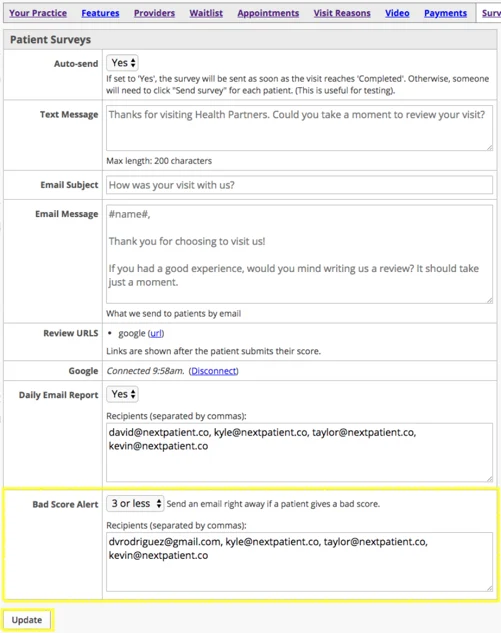
- Locate the Bad Score Alert section.

Choose your alert threshold
Use the dropdown menu to select which ratings should trigger an email notification.
For example, selecting 3 stars or below will notify your designated recipients whenever a patient submits a rating of 1, 2, or 3 stars.
Add email recipients
Enter the email addresses of the team members who should receive these notifications.
To add multiple recipients, separate each email address with a comma.
Once you've configured your alert threshold and added your recipients, click Update to save your changes.
Your designated team members will now receive email notifications when patient ratings meet your selected criteria.
Stay informed with daily email reports
In addition to low-score alerts, NextPatient offers Daily Email Reports that summarize your practice's review activity each evening.
To learn how to enable these reports and manage recipients, see Add recipients to the daily survey email.
Need help?
If you have questions about setting up low-score alerts or collecting patient feedback, please contact your Customer Success Manager.