![NextPatient_Logo_RGB_Charcoal (2).png]](https://help.nextpatient.co/hs-fs/hubfs/Logos/NextPatient%20Logos/NextPatient_Logo_RGB_Charcoal%20(2).png?height=31&name=NextPatient_Logo_RGB_Charcoal%20(2).png)
NextPatient's Referral Management feature helps your practice manage incoming referrals in one place, from receiving patient information and supporting documentation to reviewing referrals and coordinating appointments.
Receive incoming referrals
Referring providers can submit patient referrals through a secure online form integrated into your practice's website.
Through this form, referring offices can:
- Submit patient information: Share the details your team needs to begin processing a referral.
- Attach supporting documentation: Upload relevant medical records and other documents directly with the referral.
- Streamline patient registration: Depending on your practice's EHR integration, referral submissions may automatically create a new patient record or connect to an existing one, with supporting documentation saved to the patient's chart.
Note: Insurance eligibility is not automatically verified through Referral Management. Your practice is responsible for verifying insurance coverage before scheduling appointments.
Navigate the Referrals dashboard
The Referrals dashboard gives your team a centralized place to view incoming referrals, track their progress, and manage next steps.
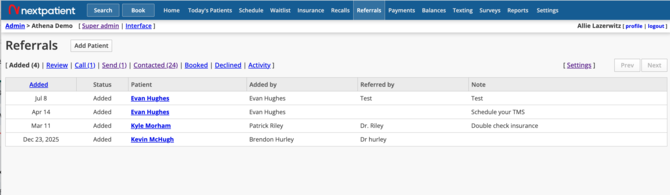
Each referral can be organized using the following statuses:
| Status | Description |
|---|---|
| Added | A new referral has been received and is awaiting review. |
| Review | Your team is reviewing the referral, such as confirming insurance eligibility or provider availability. |
| Schedule | The referral has been approved and is ready to schedule. |
| Patient Contacted | Your team has contacted the patient, but an appointment has not yet been booked. |
| Booked | The patient has successfully scheduled an appointment. |
| Declined | Your practice is unable to accommodate the referral. |
Keeping referral statuses updated helps your team stay organized and identify patients who may need additional follow-up.
Invite patients to schedule online
Once your team has reviewed and approved a referral, NextPatient makes it easy to invite the patient to schedule their own appointment.
This can reduce outbound phone calls and allow patients to book at their convenience.
Step 1: Move the referral to Schedule
After reviewing the referral and confirming the patient is ready to book, update the referral's status to Schedule.
Step 2: Send a scheduling invitation
From the referral dashboard, send the patient a personalized scheduling link via text message.
Step 3: Patient books their appointment
The patient receives a text message with a link to schedule an appointment with the appropriate provider.
The scheduling experience follows your practice's existing NextPatient scheduling configuration, including applicable appointment availability, credit card collection, and cancellation policies.
Once the patient schedules, your team can track their booking through the referral workflow.
Don't see Referral Management in your account?
Referral Management is a premium add-on feature and may not be included in your current NextPatient subscription.
If you're interested in adding Referral Management or have questions about configuring your referral workflow, please contact your Customer Success Manager.