![NextPatient_Logo_RGB_Charcoal (2).png]](https://help.nextpatient.co/hs-fs/hubfs/Logos/NextPatient%20Logos/NextPatient_Logo_RGB_Charcoal%20(2).png?height=31&name=NextPatient_Logo_RGB_Charcoal%20(2).png)
1. Receiving inbound referrals
Referring practices can submit patient information through a secure, HIPAA-compliant web form integrated directly into your website.
- Seamless Documentation: Referring offices can securely attach necessary medical records or documentation directly to the submission form.
- EHR Integration: Depending on your practice management system (e.g., Nextech), submitting this form can automatically create a new patient account or link to an existing one, saving the documentation directly to the patient's history tab.
- Note: Insurance verification is not automated through this tool. Your front office staff remains responsible for verifying insurance eligibility before scheduling.
2. Navigating the Referrals dashboard
The Referrals Dashboard is your central hub for managing all inbound referrals. Your team can track and update each referral's status in real time, ensuring no patient is overlooked.
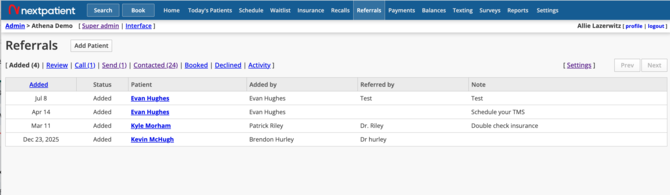
You can organize patients using the following workflow statuses:
- Added: New referrals that have just entered your system.
- Review: Referrals currently being vetted by your staff (e.g., checking insurance eligibility or provider availability).
- Schedule: Referrals that are approved and ready to book an appointment.
- Patient Contacted: Referrals who have received outreach but haven't booked yet.
- Booked: Patients who have successfully scheduled their visit.
- Declined: Referrals that your practice is unable to accommodate.
3. Inviting Patients to Self-Schedule
Patient self-scheduling is one of the most impactful features in the Referral Management tool — it significantly reduces the outbound phone calls your staff needs to make.
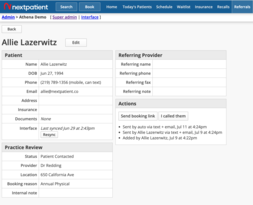
- Send a booking link: Once a referral is approved and moved to the Schedule status, you can send the patient a custom booking link via text message with a single click
- Patient experience: The patient receives the text and can securely self-schedule their appointment with the appropriate specialist at a time that works for them.
This booking flow will follow all of your existing NextPatient scheduling rules, including capturing a credit card on file and displaying your cancellation policies.
Note: Referral Management is a premium add-on. If you do not currently see this dashboard in your NextPatient portal, please reach out to your account manager to discuss adding it to your plan.