![NextPatient_Logo_RGB_Charcoal (2).png]](https://help.nextpatient.co/hs-fs/hubfs/Logos/NextPatient%20Logos/NextPatient_Logo_RGB_Charcoal%20(2).png?height=31&name=NextPatient_Logo_RGB_Charcoal%20(2).png)
To learn how to enable Waitlist for an account, please see How to Set Up Waitlist
Three ways that patients can be added to the Waitlist in NextPatient:
-
The patient signs up for the Waitlist during the booking process
-
The patient signs up for the Waitlist through their confirmation email
-
Staff manually adds patient to the Waitlist
#1: Patient adds themselves via the booking process
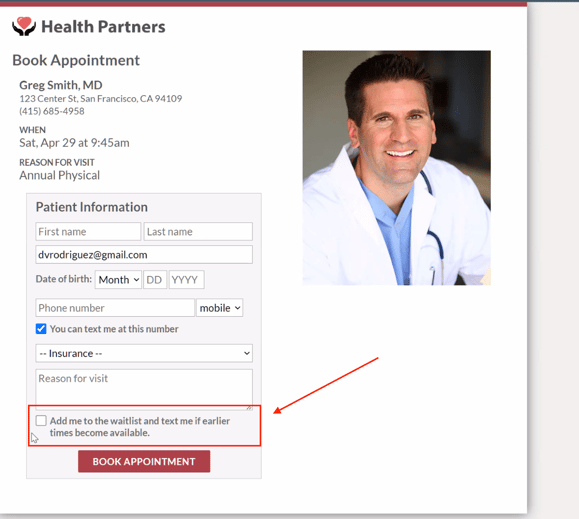
When patients book online, if the appointment that they are booking qualifies to be added to the Waitlist, they’ll see this option.
#2: Patient adds themselves via their confirmation email
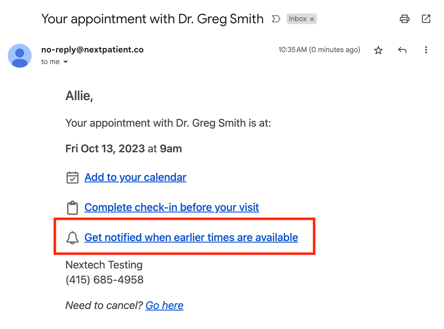
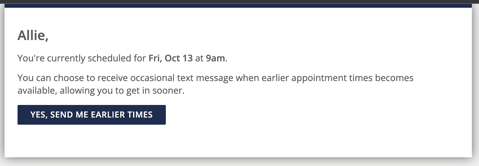
After the patient books their appointment, they will receive a confirmation email. If they are not on the Waitlist, they’ll see this option. Clicking this link will bring them to this screen where they can opt-in:
#3: Staff manually adds patient to the Waitlist in NextPatient
We currently do not pull any waiting list or call list from any PM system.
Staff can manually add patients by navigating to the patient’s appointment page, clicking “Edit” and checking this box:
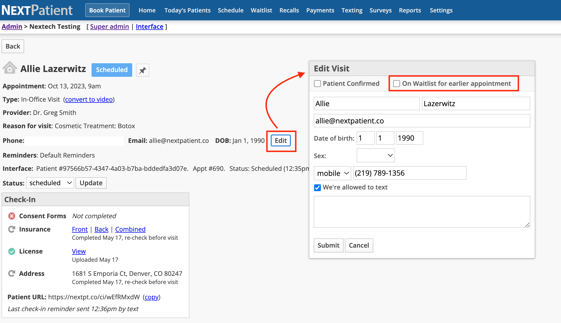
Once submitted, that patient will now be added to the Waitlist.
For any questions on how to set up Waitlist, please see How to Set Up Waitlist