![NextPatient_Logo_RGB_Charcoal (2).png]](https://help.nextpatient.co/hs-fs/hubfs/Logos/NextPatient%20Logos/NextPatient_Logo_RGB_Charcoal%20(2).png?height=31&name=NextPatient_Logo_RGB_Charcoal%20(2).png)
NextPatient offers a Daily Email Report that summarizes your practice's review activity each day. This report is sent nightly at 8:00 PM, helping your team stay informed about patient feedback without needing to log in to NextPatient.
You can customize who receives these reports at any time.
Enable daily email reports
- Log in to your NextPatient account.
- Select your practice location.
- Navigate to Settings > Surveys.
- Locate the Daily Email Report section.

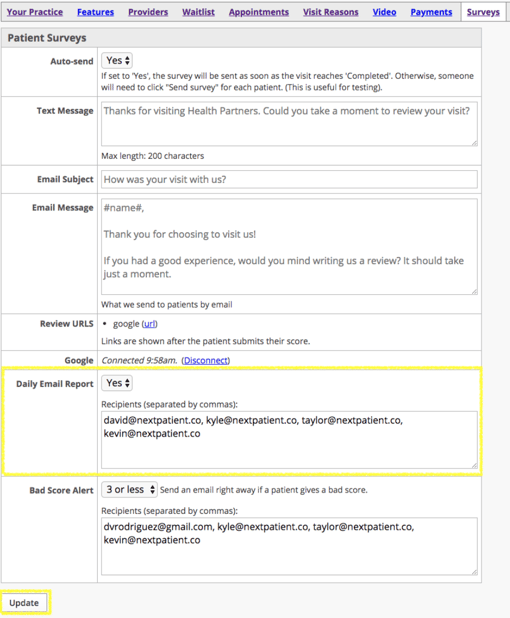
Manage email recipients
- Set Daily Email Report to Yes to enable the nightly report.
- Enter the email addresses of the team members who should receive it.
- To add multiple recipients, separate each email address with a comma.
- Click Update to save your changes.
Your designated recipients will now receive the daily report at 8:00 PM.
To stop receiving daily reports, change the setting to No and click Update.
Need help?
If you have questions about daily email reports or managing your review notifications, please contact your Customer Success Manager.
To learn how to receive notifications for low patient ratings, see Turn on low survey score alerts.