![NextPatient_Logo_RGB_Charcoal (2).png]](https://help.nextpatient.co/hs-fs/hubfs/Logos/NextPatient%20Logos/NextPatient_Logo_RGB_Charcoal%20(2).png?height=31&name=NextPatient_Logo_RGB_Charcoal%20(2).png)
A great way for your patients to find the next available time for their preferred provider is to add a scheduling widget right on the provider's page on your website!
Another great benefit of this widget is that if you have multiple locations, this will show the availability of the provider separated by each location.
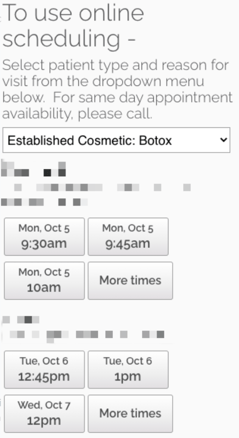
Limitations: If you have multiple locations setup in NextPatient, the Visit Reasons must be shared across all sites for this widget to work. If you have only one location, this will work just fine as well.
The first step in building your widget is to determine the {Practice ID} and the {Provider ID}:
-
Log into NextPatient (www.nextpatient.co/admin)
-
Select any location that includes the desired provider
-
Click on Settings and then Providers
-
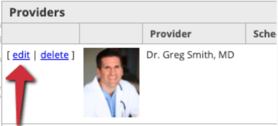
To the right of the provider's name (below the "Add Provider" section), click on Edit
-
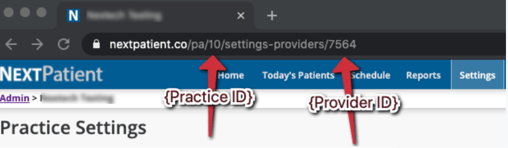
Look at the URL of the loaded page.
-
Using the following code replacing {Practice ID} and {Provider ID} with the numbers obtained in the previous step:
<div id="nextpatient-widget"></div>
<script src="https://nextpatient.co/p/(Practice ID)/(Provider ID)/provider-locations.js" async></script>For the sample image above, the code would appear like this:
<div id="nextpatient-widget"></div>
<script src="https://nextpatient.co/p/10/7564/provider-locations.js" async></script> -
Provide this code to your website editor with instructions for which page to have it appear on and you are all set. Repeat as needed for additional providers.